After reading a few articles like
this one demonstarting significant performance advantages of Kafa message brokers vs older RabbitMQ and AtciveMQ solutions I decided to give Kafka a try with the new project I am currently playing with.
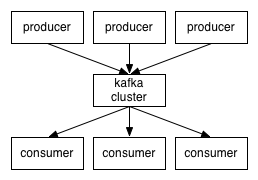
The documentation shows quite a simple initial picture, which quite the same for all the messaging systems:
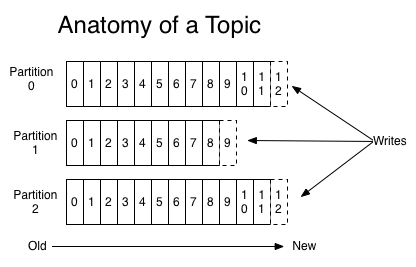
The things getting more interesting with partitioned topics
where Producers have to select to which partition they write at each time.
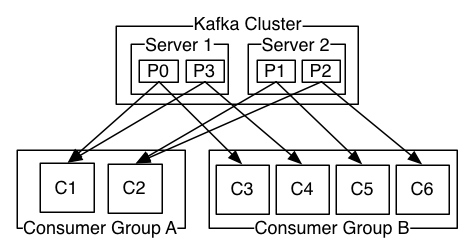
Kafka adds new Consumer Group concept.
Consumers in the same group are granted to work in queuing mode, i.e. the message delivered to consumer A in this group won't be delivered to consumer B in the same group. The same message is "broadcasted" to different consumers groups.
And this quote came to me quite surprising:
Kafka is able to provide both ordering guarantees and load balancing
over a pool of consumer processes. This is achieved by assigning the
partitions in the topic to the consumers in the consumer group so that
each partition is consumed by exactly one consumer in the group. By
doing this we ensure that the consumer is the only reader of that
partition and consumes the data in order. Since there are many
partitions this still balances the load over many consumer instances.
Note however that there cannot be more consumer instances than
partitions.
One partition = one consumer, # partitions >= # consumers.
And this is because the order of messages is granted within a partition, but not at the topic level. So actually a partition is kind of a "unique single consumer [sub]topic".
Knowning that Kafka was initially developed at LinkedIn it is actually not that surprising -
The original use case for Kafka was to be able to rebuild a user
activity tracking pipeline as a set of real-time publish-subscribe
feeds. This means site activity (page views, searches, or other actions
users may take) is published to central topics with one topic per
activity type.
Kafka FAQ says on that:
How do I choose the number of partitions for a topic?
There
isn't really a right answer, we expose this as an option because it is a
tradeoff. The simple answer is that the partition count determines the
maximum consumer parallelism and so you should set a partition count
based on the maximum consumer parallelism you would expect to need (i.e.
over-provision). Clusters with up to 10k total partitions are quite
workable. Beyond that we don't aggressively test (it should work, but we
can't guarantee it).
Here is a more complete list of tradeoffs to consider:
- A partition is basically a directory of log files.
- Each
partition must fit entirely on one machine. So if you have only one
partition in your topic you cannot scale your write rate or retention
beyond the capability of a single machine. If you have 1000 partitions
you could potentially use 1000 machines.
- Each partition is totally ordered. If you want a total order over all writes you probably want to have just one partition.
- Each
partition is not consumed by more than one consumer thread/process in
each consumer group. This allows to have each process consume in a
single threaded fashion to guarantee ordering to the consumer within the
partition (if we split up a partition of ordered messages and handed
them out to multiple consumers even though the messages were stored in
order they would be processed out of order at times).
- Many partitions can be consumed by a single process, though. So you can have 1000 partitions all consumed by a single process.
- Another way to say the above is that the partition count is a bound on the maximum consumer parallelism.
- More
partitions will mean more files and hence can lead to smaller writes if
you don't have enough memory to properly buffer the writes and coalesce
them into larger writes
- Each partition corresponds to several
znodes in zookeeper. Zookeeper keeps everything in memory so this can
eventually get out of hand.
- More partitions means longer leader
fail-over time. Each partition can be handled quickly (milliseconds) but
with thousands of partitions this can add up.
- When we
checkpoint the consumer position we store one offset per partition so
the more partitions the more expensive the position checkpoint is.
- It
is possible to later expand the number of partitions BUT when we do so
we do not attempt to reorganize the data in the topic. So if you are
depending on key-based semantic partitioning in your processing you will
have to manually copy data from the old low partition topic to a new
higher partition topic if you later need to expand.
Kafka invests a great deal of energy in keeping the messages ordered exactly like they were sent out by producers. It looks like if your system is not sensitive to the exact order of the messages (e.g. handles some events, and it does not care too much about which event came before because they anyway got their own timestamps) Kafka could introduce unnecessary complexity compared to traditional message brokers. From the other hand, Kafa excels in managing high TPS volumes, so if you plan to run more than e.g. 5K msg/sec you probably have no choice but stick to Kafka.
In addition to messaging, Kafka (like any other broker of course) can be used for centralized logs collection. The idea is that an application sends its log lines to Kafka instead of writing it on the disk.
There is log4j for Kafka connector which easily allows that (note
this config Q&A). This architectural pattern works particularly well when you deal with cloud-based systems, and especially if you work with AWS spot instances that can die before you got a chance to access any local log file.
Latest stable Kafka release at the time of writing is
0.8.2.2. I am going to install it on my VirtualBox Ubuntu 14.04 LTS VM and run a single broker to try Consumer and Producer code with it.
Default Kafka server listens on port 2181. Let's add Port Forwarding to my VM as described
here (we'll need to shutdown the machine prior to changing VirtualBox VM Settings).
Very important: Update your hosts file (C:\Windows\System32\drivers\etc\hosts) with the line like this:
127.0.0.1 ubuntuVM
where ubuntuVM stands for the name of your VirtualBox machine' hostname. If you won't do it your Windows Kafka clients will not be unable to resolve "ubuntuVM" name coming back from Kafka server on your VirtualBox. Without log4j switched on it looks like the call to synchromous calls to Producers and Consumers block. Wityh log4j you see that they actually run in the endless loop of exceptions / failures.
When the VM is restarted let's create a dedicated user for Kafka broker:
sudo useradd kafka -m
sudo passwd kafka
And now add it to sudoers
sudo adduser kafka sudo
su - kafka
Go to the
Mirrors page and select the binary, then run wget, e.g.:
wget http://apache.mivzakim.net/kafka/0.8.2.2/kafka_2.11-0.8.2.2.tgz
tar -xvf kafka_2.11-0.8.2.2.tgz
cd kafka_2.11-0.8.2.2
I want to make a few changes to the default Kafka broker configuration in
/config/server.properties
First, I want to set
num.partitions=512
(instead of the default 1), so I will be able to run up to 512 consumers simulatenously .
Next, I am looking to manipulate topics programmatically, so I am adding
delete.topic.enable=true
to the "Server Basics" section (like suggested
here).
Save the file
If you do not have Java installed yet you can follow
this post to manually install Oracle JDK. Otherwise, we are good to continue. Start ZooKeeper instance via supplied script:
bin/zookeeper-server-start.sh config/zookeeper.properties
and start Kafka broker in another terminal window
bin/kafka-server-start.sh config/server.properties
To make sure we got everything working let's open MS "cmd.exe" and type there
telnet localhost 2181
we should be now connected to our Kafka broker. Disconnect / close "cmd.exe".
Next, let's open yet another (3-rd) terminal window and make sure we can create a topic and listen to it with a consumer, provided "in the box":
bin/kafka-topics.sh --create --zookeeper localhost:2181 --replication-factor 1 --partitions 1 --topic test
bin/kafka-console-consumer.sh --zookeeper localhost:2181 --topic test --from-beginning
Now it is the time to start developing some Java code to try our own Producer. Note that since version 0.8.2 Kafka introduces new clients API, and the new
KafkaProducer class is the first step to better clients.
Maven dependency for pom.xml is as follow:
<dependency>
    <groupId>org.apache.kafka</groupId>
    <artifactId>kafka-clients</artifactId>
    <version>0.8.2.2</version>
</dependency>
It is important to properly initialize log4j so if Kafka client library throws some errors you at least can see them.
You can add
-Dlog4.configuration=file:/...
option to your run time
(IntelliJ sample where to add log4j config file name in IDE)
and the config file can look e.g. this way:
log4j.rootLogger=debug, stdout, R
log4j.appender.stdout=org.apache.log4j.ConsoleAppenderlog4j.appender.stdout.layout=org.apache.log4j.PatternLayout
# Pattern to output the caller's file name and line number.log4j.appender.stdout.layout.ConversionPattern=%5p [%t] (%F:%L) - %m%n
log4j.appender.R=org.apache.log4j.RollingFileAppenderlog4j.appender.R.File=example.log
log4j.appender.R.MaxFileSize=100KB# Keep one backup filelog4j.appender.R.MaxBackupIndex=1
log4j.appender.R.layout=org.apache.log4j.PatternLayoutlog4j.appender.R.layout.ConversionPattern=%p %t %c - %m%n
This simple Producer test should now work:
import java.util.Properties;
import java.util.concurrent.ExecutionException;

import org.apache.kafka.clients.producer.KafkaProducer;
import org.apache.kafka.clients.producer.ProducerConfig;
import org.apache.kafka.clients.producer.ProducerRecord;
import org.apache.kafka.common.serialization.StringSerializer;

/** * An example using the new java client Producer for Kafka 0.8.2 * * 2015/02/27 * @author Cameron Gregory, http://www.bloke.com/ */public class KafkaTest {
    public static void main(String args[]) throws InterruptedException, ExecutionException {
        Properties props = new Properties();
        props.put(ProducerConfig.BOOTSTRAP_SERVERS_CONFIG,"localhost:9092");
        props.put(ProducerConfig.VALUE_SERIALIZER_CLASS_CONFIG,StringSerializer.class.getName());
        props.put(ProducerConfig.KEY_SERIALIZER_CLASS_CONFIG,StringSerializer.class.getName());

        KafkaProducer producer = new KafkaProducer(props);

        boolean sync = true;
        String topic="test";
        String key = "mykey";
        String value = "myvalue";
        ProducerRecord producerRecord = new ProducerRecord(topic, 0, key, value);
        if (sync) {
            producer.send(producerRecord).get();
        } else {
            producer.send(producerRecord);
        }
        producer.close();
    }
}
If all the setting are fine we will see
myvalue
message in our consumer running in the VirtualBox. Our Windows-based Kafka Producer sent a message to VirtualBox-installed Kafka server and VirtualBox-installed Consumer got it! Now we can go wild and develop better Producer and Consumers on Windows vs. VirtualBox Kafka server.
However, the real deal is writing a good Consumer. And this is because Kafka very much differes from e.g. RabbitMQ. A RabbitMQ consumer which just connects to a topic will get the first message, than the next one and so on. Two connected RabbitMQ consumers will get messags in the round-robin manner.
Kafka consumers are different. First, there are two types of consumers:
"high-level" and
"simple". Next, the High Level consumer, which is the simpliest Kafka consumer implemenattion is not set to get "old" messages that were published to the topic prior its run.
So if you want to follow RabbitMQ consumers behavior, i.e. start reading messages that were published on the topic everytime the consumer starts you have no choice but looking into the "simple consumer".
Kafka is written in Scala and I found
ConsoleConsumer which is provided as a part of Kafka packages and behaves exactly like I wanted, reading the topic from the beginning. I added Scala 2.11.7 to my ItelliJ project (right-click on project, "Add Framework Suport...", then do teh same on the module where you want Scala), created a new Scala script file and copied the code there to see how it runs. Oops...
Error:scalac: Error: object VolatileByteRef does not have a member create
scala.reflect.internal.FatalError: object VolatileByteRef does not have a member create
at scala.reflect.internal.Definitions$DefinitionsClass.scala$reflect$internal$Definitions$DefinitionsClass$$fatalMissingSymbol(Definitions.scala:1186)
at scala.reflect.internal.Definitions$DefinitionsClass.getMember(Definitions.scala:1203)
at scala.reflect.internal.Definitions$DefinitionsClass.getMemberMethod(Definitions.scala:1238)
at scala.tools.nsc.transform.LambdaLift$$anonfun$scala$tools$nsc$transform$LambdaLift$$refCreateMethod$1.apply(LambdaLift.scala:41)
[...]
at sbt.compiler.AnalyzingCompiler.compile(AnalyzingCompiler.scala:41)
at org.jetbrains.jps.incremental.scala.local.IdeaIncrementalCompiler.compile(IdeaIncrementalCompiler.scala:29)
at org.jetbrains.jps.incremental.scala.local.LocalServer.compile(LocalServer.scala:26)
at org.jetbrains.jps.incremental.scala.remote.Main$.make(Main.scala:62)
at org.jetbrains.jps.incremental.scala.remote.Main$.nailMain(Main.scala:20)
at org.jetbrains.jps.incremental.scala.remote.Main.nailMain(Main.scala)
at sun.reflect.NativeMethodAccessorImpl.invoke0(Native Method)
at sun.reflect.NativeMethodAccessorImpl.invoke(NativeMethodAccessorImpl.java:62)
at sun.reflect.DelegatingMethodAccessorImpl.invoke(DelegatingMethodAccessorImpl.java:43)
at java.lang.reflect.Method.invoke(Method.java:497)
at com.martiansoftware.nailgun.NGSession.run(NGSession.java:319)
Further more, even this HelloWorld sample
object HelloWorld {
  def main(args: Array[String]) {
    println("Hello, world!")
  }
}
compiles, but fails to run with a similar error. It took me sometime to recognize that my Kafka libraries are compiled with Scala 2.10 while I run IntelliJ with Scala 2.11.7 - and this what actually caused the trouble! Once I changed my Maven dependencies from Kafka_2.10 to Kafka_2.11
<dependency>
    <groupId>org.apache.kafka</groupId>
    <artifactId>kafka_2.11</artifactId>
    <version>0.8.2.2</version>
</dependency>
the HelloWorld sample started to run showing the expected output:
Hello, world!
Process finished with exit code 0
and I was able to run the ConsoleConsumer as well.
Another finding is that Kafka_2.10 Consumer can not get early messages from Kafka_2.11 server, even when this is the same 0.8.2.2 Kafka version. Something goes wrong with
ZkUtils.maybeDeletePath(a_zookeeper, "/consumers/" + a_groupId);
when 2.10-0.8.2.2 Consumer attempts to read historical messages from 2.11-0.8.2.2 server.
Also, it is mandatory to specify
props.put("auto.offset.reset", "smallest");
in order to get already stored messages from the beginning of the queue. Two above lines do all the magic, allowing the Consumer to read the previous messages. Here is a sample Java code for the High Level Kafka Consumer which reads all historical messages, just like ConsoleConsumer.scala does (works):
import kafka.consumer.ConsumerConfig;
import kafka.consumer.ConsumerIterator;
import kafka.consumer.KafkaStream;
import kafka.javaapi.consumer.ConsumerConnector;
import kafka.utils.ZkUtils;

import java.util.HashMap;
import java.util.List;
import java.util.Map;
import java.util.Properties;

public class KafkaBasicConsumerTest {

    public KafkaBasicConsumerTest() {
    }

    public void run( String a_zookeeper, String a_groupId, String a_topic){
        Properties props = new Properties();
        props.put("zookeeper.connect", a_zookeeper);
        props.put("group.id", a_groupId);
        props.put("auto.offset.reset", "smallest"); // start reading from the beginning
        props.put("zookeeper.session.timeout.ms", "4000");
        props.put("zookeeper.sync.time.ms", "2000");
        props.put("auto.commit.interval.ms", "500");
        ConsumerConfig consumerConfig = new ConsumerConfig(props);

        ConsumerConnector consumer = kafka.consumer.Consumer.createJavaConsumerConnector( consumerConfig);
        ZkUtils.maybeDeletePath(a_zookeeper, "/consumers/" + a_groupId);

        Map topicCountMap = new HashMap();
        topicCountMap.put(a_topic, 1);
        Map>> consumerMap = consumer.createMessageStreams(topicCountMap);
        List> streams = consumerMap.get(a_topic);
        KafkaStream stream = streams.get(0);

        ConsumerIterator it = stream.iterator();
        while(it.hasNext())
            System.out.println( "Received Message: " + new String(it.next().message()));
    }


    public static void main(String[] args) {
        KafkaBasicConsumerTest consumer = new KafkaBasicConsumerTest();
        consumer.run( "127.0.0.1:2181", "test-group",  "test");
    }
}
Of course there is no errors handling, no proper shutdown and no multithreading. It all should be added to a HL Kafka Consumer once you move on.
It is important to understand the following:
Kafka requires the Consumers to manage what they already read / consume and what they did not
. Zookeper helps in storing the last read offset for each Consumers Group (i.e. for HL Consumers). If the Consumer [Group] never accessed a topic it got no previous offset there and, unless a special magic happens, can not see the messages the Producers sent there. However, if a certain Consumer [Group / HL Consumer] has accessed the topic at least once Zookeper saves its offset and the Consumer will be feeded with all the messages the Producers sent when the Consumer[Group] was offline at the next time the Consumer[Group] connects to the topic.




 Posts
Posts

